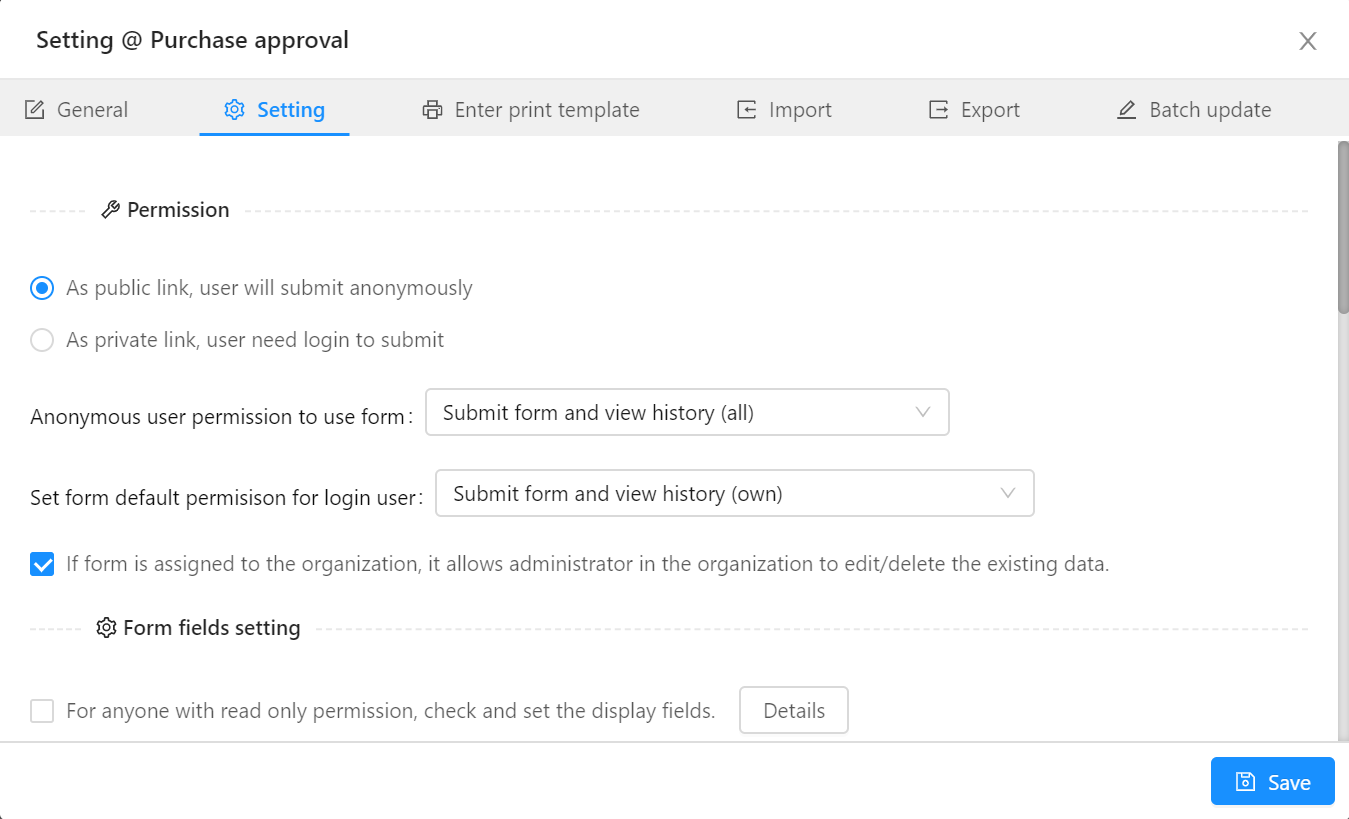
Form Setting -> Permission
Form Data Permission
In form settings, the form authors can define the different types of form data access permission.
- Public form: Anyone can submit the form data without logging in
- Private form: Login is required to access the form data
Public form
Form authors can define the different form data access permissions for logged-in users and anonymous users.
For anonymous users, it has the following selection:
- Allow submit form only
- View history (all)
- Submit form and view history (all)
- Allow edit form (all)
For logged-in users, the form has the following permissions:
- Read only
- Allow submit form only
- Submit form and view history (own)
- View history (all)
- Submit form and view history (all)
- Allow edit form (own)
- Allow edit form (own) and view history (all)
- Allow edit form (all)
- Allow delete form (own)
- Allow delete form (all)
- All permission (as owner)
Private form
Private form is only available for logged-in users. Form authors can select one of the following selections:
- Read only
- Allow submit form only
- Submit form and view history (own)
- View history (all)
- Submit form and view history (all)
- Allow edit form (own)
- Allow edit form (own) and view history (all)
- Allow edit form (all)
- Allow delete form (own)
- Allow delete form (all)
- All permission (as owner)
Administrator extra permission
In form settings, the form authors can also add extra permission for the organization administrator. Check the
following information if necessary.
If form is assigned to the organization, it allows administrator in the organization to edit/delete the existing data.
« Form Setting
Form field settings »